DGW-3004 Failover Operation Manual
1 Overview
1.1 Purpose
This document describes the working principle, basic configuration requirements, and operation methods of the Failover function on the DGW-300X digital gateway. When the DGW-300X experiences power failure, reboot, upgrade, hardware abnormality, or similar conditions, failover link switching is performed to reduce the impact of line failures on voice services.
1.2 Topology Description
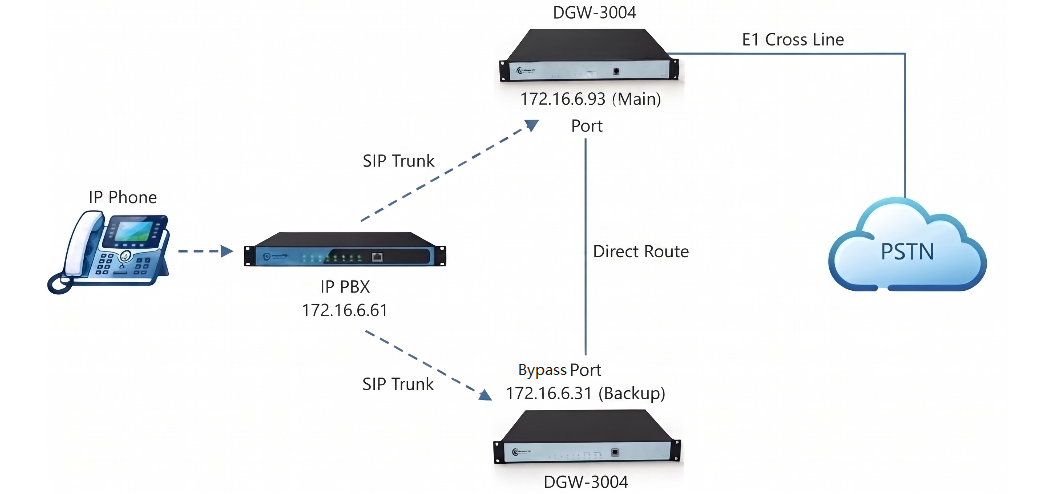
Based on the topology diagram, the device roles are as follows:
-
Internal extension:
7001 -
IPPBX: Connects to both the primary and standby digital voice gateways, and is configured with a failover rerouting policy.
-
Gateway 1: DGW-300X digital gateway, used as the primary gateway with the Failover function enabled.
-
Gateway 2: DGW-300X digital gateway, used as the standby gateway.
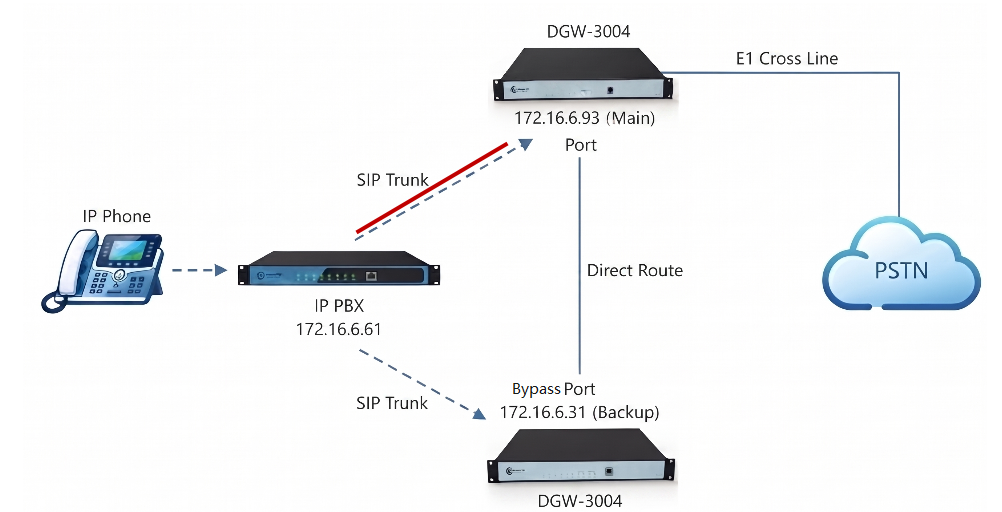
When the primary gateway is operating normally, the call flow is shown by the red line in the following diagram:
Under normal conditions, the IPPBX routes calls to the primary gateway. The primary gateway completes SIP and signaling conversion, and accesses the PSTN through the E1/PRI line.
When the primary gateway fails, the call flow is shown in the following diagram:

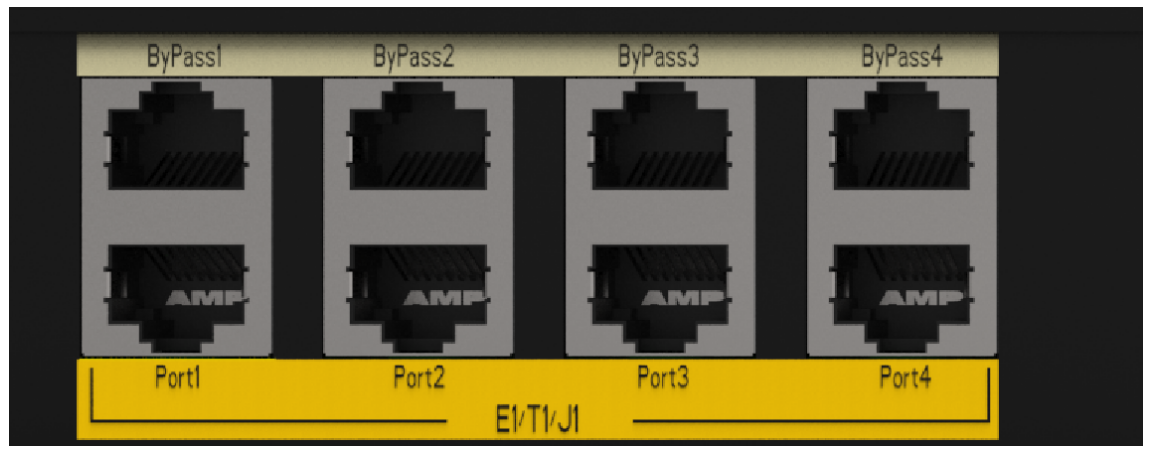
In the failure state, the IPPBX switches calls to the standby gateway according to the failover rerouting policy. After the standby gateway completes SIP and signaling processing, the E1 signal enters from the Bypass port of the DGW-3004, then is output from the Port port to the PSTN through the device’s internal passthrough channel.
1.3 Working Principle
The DGW-300X Failover function controls the physical connection state between the Port and Bypass ports through the internal relay of the device, and works together with the IPPBX failover rerouting policy to implement switching between the primary and standby links. The Port port connects to the PSTN/E1 line, and the Bypass port connects to the E1-side interface of the standby gateway.
-
When the primary gateway is normal: The
PortandBypassports remain disconnected. The IPPBX routes calls to the DGW-3004. The DGW-3004 completes SIP and PRI signaling conversion, and accesses the PSTN through thePortport. -
When the primary gateway fails: When the DGW-3004 experiences power failure, reboot, system upgrade, hardware abnormality, or similar conditions, the relay automatically switches to passthrough state, connecting
BypassandPortinside the device. At this time, the IPPBX switches calls to the standby gateway, and the standby gateway completes SIP and PRI signaling processing. The processed E1 signal enters the internal passthrough channel from theBypassport of the DGW-3004, then is output to the PSTN from thePortport. -
After the primary gateway recovers: In automatic mode, after the DGW-3004 recovers and runs stably, the system automatically disconnects the passthrough channel between
BypassandPort, and calls are handled by the primary gateway again. In manual mode, the primary gateway will not automatically take over services after recovery. The administrator must manually enable the primary unit on the web page.
The physical passthrough action of Failover is completed by the internal relay of the DGW-300X, and call route switching is completed by the IPPBX failover rerouting policy. Therefore, the standby gateway does not need to support the DGW-300X Failover function, but it must complete the basic configuration related to the IPPBX and the carrier PRI line.
1.4 Basic Configuration Requirements
This document uses PRI signaling as an example. The Failover function of the DGW-300X digital gateway also applies to other E1/T1 signaling types supported by the device. The actual configuration should be based on the on-site lines and carrier requirements.
Both digital gateways must complete the following configurations. For detailed operations, refer to the user manual of the corresponding device:
-
PRI signaling: Both the primary and secondary gateways must be configured with the PRI signaling connected to the carrier, ensuring that both the primary and standby gateways can independently access the PSTN.
-
SIP trunk: Both the primary and secondary gateways must be configured with SIP trunks to the same IPPBX, ensuring that the IPPBX can initiate calls to the primary and standby gateways respectively.
The IPPBX side must complete the following configurations. For detailed operations, refer to the user manual provided by the IPPBX manufacturer:
-
Outbound route: Calls are preferentially routed out through the primary gateway. When the primary gateway is unavailable, calls are switched to the standby gateway according to the failover rerouting policy.
-
Inbound route: Ensure that incoming calls from both the primary and standby gateways to the IPPBX can be correctly routed to the target extension or service destination.
-
Failover rerouting: Configure the standby route after the primary gateway trunk fails, so that calls can be automatically routed to the standby gateway when the primary gateway fails.
2 Failover Related Configuration
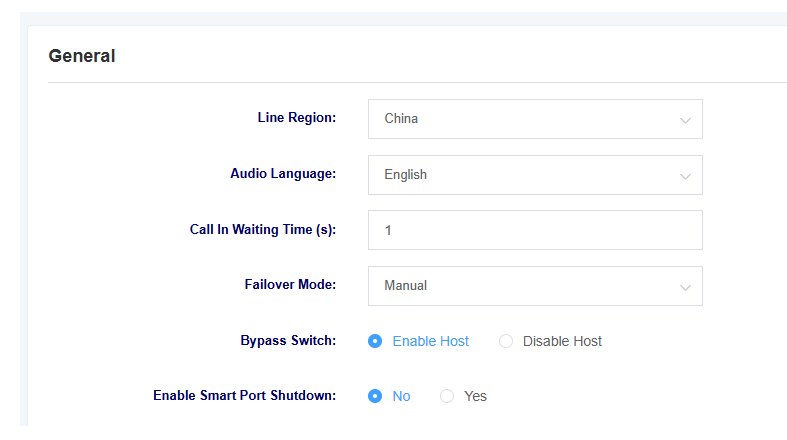
Access path: Advanced Configuration -> E1 Settings
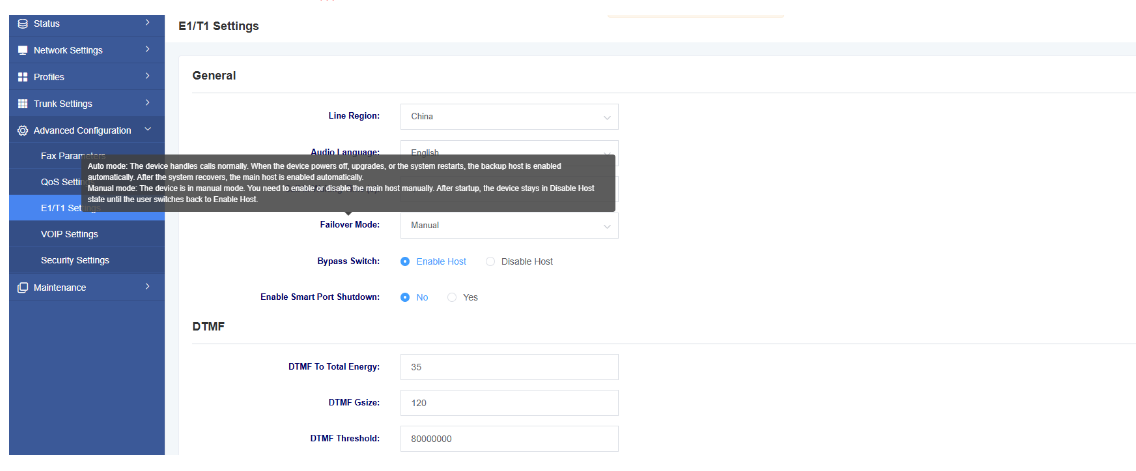
-
Auto mode: The device handles calls normally. When the device powers off, upgrades, or the system restarts, the backup host is enabled automatically. After the system recovers, the main host is enabled automatically.
-
Manual mode: The device is in manual mode. You need to enable or disable the main host manually. After startup, the device stays in Disable Host state until the user switches back to Enable Host.
2.1 Automatic Mode
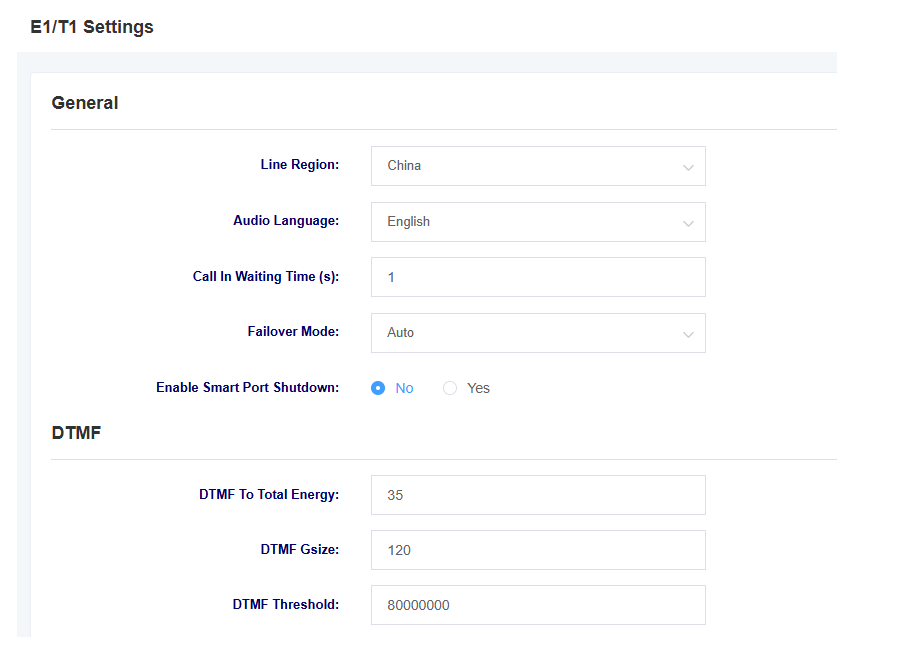
Automatic mode applies to scenarios where the primary gateway is expected to automatically switch back after recovery. After automatic mode is enabled, the system automatically controls the connection state between the Port and Bypass ports according to the status of the primary gateway.
-
During normal operation: The primary gateway handles calls, and the standby gateway remains in standby state.
-
When the primary gateway fails: When the primary gateway service is interrupted due to power failure, system reboot, firmware upgrade, or hardware abnormality, the system automatically switches to Bypass passthrough state. The IPPBX routes calls to the standby gateway according to the failover rerouting policy, and the standby gateway takes over the service.
-
When the primary gateway recovers: After the primary gateway recovers and runs stably, the system automatically exits the Bypass passthrough state. Calls are handled by the primary gateway again, and the standby gateway returns to standby state.
The switching process in automatic mode requires no manual intervention, and is suitable for scenarios with high requirements for service continuity and automatic recovery.
2.2 Manual Mode
Manual mode applies to maintenance, troubleshooting, or scenarios where manual control of primary/standby switching is required. In manual mode, the primary gateway will not automatically take over services after recovery. The administrator must switch manually according to the on-site situation.
2.2.1 Enable Primary Unit
After selecting “Enable Primary Unit”, the primary gateway handles calls, the Port and Bypass ports remain disconnected, and calls access the PSTN normally through the primary gateway.
When the primary gateway experiences power failure, system reboot, or other faults, the Bypass and Port ports enter passthrough state. At this time, the IPPBX switches calls to the standby gateway for processing, and the E1 signal processed by the standby gateway accesses the PSTN through the internal passthrough channel of the primary gateway.
After the primary gateway is powered on again and completes startup, services will not automatically switch back to the primary gateway. If calls need to be handled by the primary gateway again, the administrator must manually select “Enable Primary Unit” on the Bypass switch page.
2.2.2 Disable Primary Unit
After selecting “Disable Primary Unit”, the primary gateway exits the primary service role, and the Bypass and Port ports enter passthrough state. The IPPBX should route calls to the standby gateway. The standby gateway completes SIP and PRI signaling processing, and accesses the PSTN through the internal passthrough channel with the primary gateway.
This operation is usually used for primary gateway maintenance, primary link troubleshooting, or scenarios where services need to be forced to use the standby gateway.